
Your First Program
As a ritual the very first program of any language is the “Hello, world!” program. It merely prints out Hello, world to the computer screen.
A Hello, world program in C++ is:
#include <iostream>
using namespace std;
int main()
{
    cout<<"Hello world!"<<endl;
    return 0;
}
Seems too much, isn’t it?
First of all copy paste this code in code::blocks and run it using the build and run button highlighted in the image.
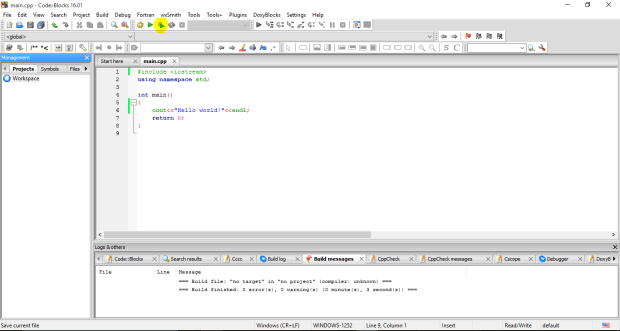
Now as you can understand what this code is doing. Let’s see how.
The one line whose work can be seen on the screen is cout. The cout<<“Some text”<<endl; is used to print something to the screen.
endl is used give a line break. If you use another cout statement, it will be printed in next line as endl is used in the previous line.
A semicolon (;) is used to end a statement. A semicolon tells the compiler that it is the end of a logical expression.
A C++ program always contains a main function. The return type of a main is int (int stands for integer).
Remember: Printing something to screen is not returning.
Curly brackets {} are used to define a block of code. Whenever a new function is defined curly brackets {} are used to represent what the function does when executed.
#include <xyz> tells the compiler about which headers to use. There are many built-in headers which help us in doing a lot of task. The name of the header is written in the place of xyz. The stands for input-output stream which helps us to get input from the user and print it on the screen.
using namespace std; tells the compiler to use the std (standard) namespace.
return 0; returns 0 as the return type of main is int so an int should be returned.
Now as you have understood the terms, you can now try experimenting with your program.
Try and print something else. Use cout 2 times. Find out the effects that occur when you don’t use endl. Use cout<<“text”<<“text2”; to print two text in same line. This will help you to get used to the basic syntax of C++.
An exercise question for you can be:
Q. Print out your Name, Age etc. to screen. Every new entry should be in a newline.
If you have any doubts regarding this lesson, you can reach me out in comments. Thank you. 🙂
 The Programmer
2 thoughts on “Your First Program”