
For loop
When we know about the terminating condition, but we don’t know how many times the loop will execute, we use while loop. But at times we just want our code to run a fixed number of times, no matter what is in the statements, then for loop is used. The syntax of a for loop is:
for (init;condition;increment)
{
statements;
}
The init is used for initialization. This statement is executed only once when the loop is started.
Then, the condition is executed, and the body of the loop is evaluated if the condition is true. Then the increment changes the value and the same loop run until the condition becomes false.
For example:
for (int i=1;i<=5;i++) //i+=1 can also be used
{
    cout<<"loop"<<i<<endl;
}
The output will be:
loop1
loop2
loop3
loop4
loop5
When i become 6 the condition (i<=5) becomes false. Thus the execution stops.
The do…while Loop
The body of for and while executes only when the condition is true, but a do…while loop executes first and then check the condition. The do…while loop is almost similar to while loop, the only difference is that the do…while loop executes at least once. Syntax:
do {
    statements;
} while (condition);
Don’t forget the semicolon after the while statement.
Honestly speaking the do…while loop is not that useful. But the for and while loops will be used more often while programming. Focus on them, learn the syntax, try different variety of questions and you will have a very good time programming.
Logical Operators
The Logical Operators will be of great help to you when dealing with conditions. When you want to check two conditions to be true or false the Logical Operators can be used.

AND Operator
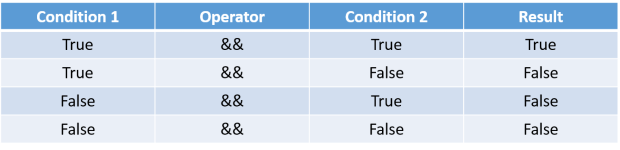
The AND Operator takes two operands and return true only if both the operands are true. The two operands can be conditions or numerical value.
When numerical value like 0,1,2 etc. are used as conditions, all values except 0 are treated as true and 0 is treated as false.
The table summarizes the return value of AND Operator.
For example:
int age = 21;
int money = 2000;
if (age>18 && money>=1000)
{
cout<<"You are in.";
}
//Outputs "You are in."
Remember: AND Operator only return true if both the conditions are true.
OR Operator
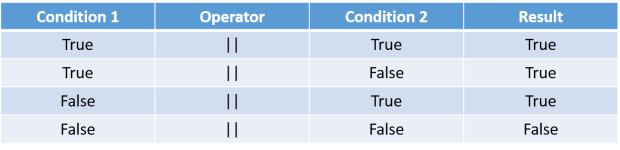
The OR Operator evaluates to true if any one or both of the two conditions are true. Thus:
For example:
int age = 60;
int money = 4000;
if (age<50 || money>2000)
{
cout<<;"You are in.";
}
//Outputs "You are in."
Remember: OR operator returns false only when both the conditions are false.
NOT Operator
The NOT operator takes only one operand and returns its opposite.

For example:
int age = 16;
if (!(age>18)) //false became true
{
cout<<"Your age is less than 18";
}
//Outputs "Your age is less than 18"
Remember: NOT operator return the opposite
In this lesson we have learned about more types of loops and Logical Operators. Loops can do big tasks very easily and Logical Operators will help you build more better conditions. Practice them all. If you have any doubt regarding the lesson, you can ask in comments. Thanks.
 The Programmer