
You have learned about getting inputs and displaying outputs but their are certain cases where we want to execute program according to the given input. For example:
A vegetable vendor is left only with spinach. Now if any one asks for spinach he will say Yes, if any other vegetable is asked for he will say No. How to implement this in our program?
It can be achieved easily by if-else statements. The syntax for if-else is:
This file contains hidden or bidirectional Unicode text that may be interpreted or compiled differently than what appears below. To review, open the file in an editor that reveals hidden Unicode characters.
Learn more about bidirectional Unicode characters
| if (condition) { | |
| //statement | |
| } | |
| else { | |
| //Another statement | |
| } |
If the condition is true the statements inside if will be evaluated otherwise statements inside else will be evaluated. If can also be used without else, at that time if the condition evaluates to false the statements will be ignored.
For our example problem, the condition is “if the input equals spinach.”
To check whether something equals another thing == (Equal equal) operator is used.
That is:
if (query == “spinach”) {
cout<<“Yes”;
}
else {
cout<<“No”;
}
To convert it into a whole program we need to take the input from the user and then check it. Here is the whole program.
There are some more operators which are used to check conditions. Here is the table describing all of them:
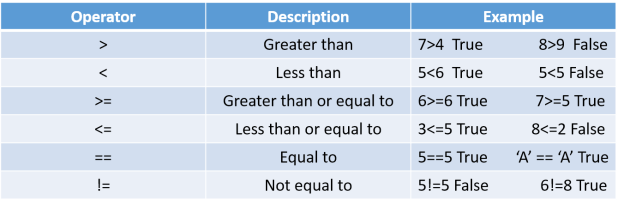
If we want to check more than one conditions than else-if statement is used. For example:
This file contains hidden or bidirectional Unicode text that may be interpreted or compiled differently than what appears below. To review, open the file in an editor that reveals hidden Unicode characters.
Learn more about bidirectional Unicode characters
| if (7>4) { | |
| cout<<"7 is greater than 4"; | |
| } | |
| else if (5>=4) { | |
| cout<<"5 is greater than equal to 4"; | |
| } | |
| else { | |
| cout<<"4 is greatest"; | |
| } | |
This is a better way to check conditions of different kind. But if we want to check many conditions of same kind then C++ have another function called the switch statement which can be of help to us.
The syntax of switch statement is:
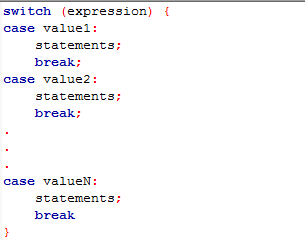
The use of break here is to stop executing after the value is found. You will understand it better with example.
If we want to print grade of a student according to marks. The switch statement will come handy. This is the code:
This file contains hidden or bidirectional Unicode text that may be interpreted or compiled differently than what appears below. To review, open the file in an editor that reveals hidden Unicode characters.
Learn more about bidirectional Unicode characters
| #include <iostream> | |
| using namespace std; | |
| int main() | |
| { | |
| int marks; | |
| cout<<"Enter the marks out of 10"<<endl; | |
| cin>>marks; | |
| switch(marks) | |
| { | |
| case 10: | |
| cout<<"A+"; | |
| break; | |
| case 9: | |
| cout<<"A"; | |
| break; | |
| case 8: | |
| cout<<"B+"; | |
| break; | |
| case 7: | |
| cout<<"B"; | |
| break; | |
| case 6: | |
| cout<<"C"; | |
| break; | |
| case 5: | |
| cout<<"D"; | |
| break; | |
| default: | |
| cout<<"Low marks"; | |
| break; | |
| } | |
| return 0; | |
| } |
To get to know about the importance of break statement, copy this code in Code::Blocks and remove break statements. You will find that all the statements after a certain case gets executed.
Here, a default statement is also used. This statement runs when none of the cases matches with the marks. It is important to add default to get the output for the case which is not defined in the switch statement.
So we have learned about all the conditionals today. You can use them to create any project where the output depends on the input. I believe that you have understood conditionals. Though if you have any doubt, you can ask in comments. Goodbye.
 The Programmer